Nested parallelism, Java 8 parallel streams, Bug in the ForkJoinPool framework.
Java 8 Parallel Streams Deadlocking
The Java 8 parallel streams api supports parallel processing of operators and parallel foreach loops. However, it appears as if the backend executor framework, the fork/join pool, has a problem with nested parallel loops: If you use nested parallel streams, e.g. likeIntStream.range(0,24).parallel().forEach(i
-> {
// do some heavy work here
IntStream.range(0,100).parallel().forEach(j
-> {
// do some work here
});
});
you may observe very poor performance at high CPU usage. For example, runnning the test program at NestedParallelForEachBenchmark.java I get the following results:
Timing for test cases (parallelism set to 2):
inner loop parallel = 41,18 +/- 2,99 (min: 33,14 , max: 45,59) [CPU Time: 106,00] (number of threads in F/J pool: 8)
inner loop sequential = 27,61 +/- 0,50 (min: 26,62 , max: 28,61) [CPU Time: 76,91] (number of threads in F/J pool: 2)
inner loop parallel with bugfix = 26,99 +/- 0,81 (min: 25,75 , max: 28,77) [CPU Time: 77,73] (number of threads in F/J pool: 2)
(test cases were run independent with 20 warm up runs and 20 test runs on an Intel i7@2.6 GHz).
In addition, using synchronization may lead to (unexpected) deadlocks. For example, the following code will result in a deadlock:
IntStream.range(0,24).parallel().forEach(i
              -> {


                // do some heavy work here


                synchronized(this) {


                  IntStream.range(0,100).parallel().forEach(j
              -> {


                    // do some work
              here


                  });


                }


              });
In this test case we generate 24 parallel tasks to make some calculation. At one point we need to synchronize (assume we need to access some state). There is only one thread entering the synchronized() part. Inside the synchronized part we evaluate some function in parallel (why not, all the other threads are waiting anyway), but that is fine (there is no nested locking). Some might suspect that - given that all tasks are submitted to a common thread pool - there are no more threads to calculate the inner loop in parallel. However, even if there are no more free workers, there is at least one active thread, namely that one which entered the synchronized {} block, and we expect that parallel execution defaults to in-line sequential execution if there are no additional threads available.
The parallel streams use a common ForkJoinPool as a backend, and this behavior is implemented in the ForkJoinTask: it distinguishes between a ForkJoinWorkerThread and the main Thread and all tasks which cannot be completed by a ForkJoinWorkerThread can run (sequentially) on the main Thread.
Also note, that the documentation of the backend ForkJoinPool states that
- but a deadlock would only be expected if the number of available threads is exhausted (and we are far below that number). So while synchonize should be avoided, the documentation of the ForkJoinPool does not forbit synchronization."The pool attempts to maintain enough active (or available) threads by dynamically adding, suspending, or resuming internal worker threads, even if some tasks are stalled waiting to join others. However, no such adjustments are guaranteed in the face of blocked IO or other unmanaged synchronization."
Even without the synchronize the bug will lead to performance issues (see a corresponding post on stackoverflow).
The Bug
The test whether a task is running on a main thread (the creator of that loop) or running on a worker is performed via the line (401 in ForkJoinTask of 1.8u5 (Java 8))((t = Thread.currentThread()) instanceof
ForkJoinWorkerThread)
so it just tests if the currentThread is of type ForkJoinWorkerThread. But for a nested loop, the calling thread (the creator) could itself be of type ForkJoinWorkerThread, because it is a worker of the outer loop. In that case the inner loops task is joined with another outer loop task (which is currently waiting for the synchronized lock) and this results in a deadlock.
Reproducing the bug
To reproduce the bug and check the claim:- Run the program NestedParallelForEachAndSynchronization.java (see below) in a debugger. It will hang in a deadlock in the last test case (a simple nested loop with inner synchonization).
- In the debugger suspend all threads and check where theses threads are waiting.
- You will find out that all threads wait for the synchronize lock inside the outer loop and that lock is owned by one of the threads, lets call that thread ForkJoinPool.commonPool-worker-7.
- If you check ForkJoinPool.commonPool-worker-7 then you see that he waits of the synchronize lock too, but he is already inside the inner loop. Now, lets check why a pice of code inside the synchronize waits for the lock: You see that the wait() is issued by the awaitJoin() in line 402 of ForkJoinTask. This is wrong, instead that task should have done an externalWaitDone(). Explanation: That task is the main task of the inner loop, i.e., a task of the outer loop that created the inner loop, but (due to a bug) that tasks considers itself as a forked worker (of the inner loop) and creates a join - effectively joining with the outer loop’s task. The problem is that if the inner loop is running on a forked worked of the outer loop, we cannot distinguish forked (inner loop’s) worker from main threads because line 401 is always true.
- Double Checking: If the explanation in 4 would be correct, the problem would go away if we fix line 401 (and also all other corresponding tests). To fix this we change the type of the thread containing the inner loop from ForkJoinWorkerThread to Thread (by creating a wrapper). Indeed: this fixed that deadlock and greatly improved performance. The second test case in NestedParallelForEachAndSynchronization.java does this.
Perfomance Problem induced by the Bug
The faulty join may lead to performance problems. For a complete test demonstrating the performance issue see NestedParallelForEachBenchmark.java or NestedParallelForEachTest.java.Epilog
Nested parallelism may occure quite natural: ConsiderIntUnaryOperator func = (i) ->
IntStream.range(0,100).parallel().map(j ->
i*j).sum();- a definition of a function i -> func(i), which is defined as a sum of i*j and which is internally calculated in parallel. and then do
IntStream.range(0,100).parallel().map(func).sum();
(a discrete approximation of a two dimensional integral). Of course, this code (and other such problems) can be reformulated into a non-nested version, but assuming that you like to encapsulate the internal definition of
func, the
nesting is a consequence of abstraction.
I first encountered that bug via a deadlock introduced by using a Semaphore inside the outer loop (e.g. like a blocking IO). I have posted this to stackoverflow (and, following a suggestion on SO, to the concurrency-interest mailing list). The discussion started by that post then focussed on the question whether using a Semaphore and/or nested parallel loops would be a good design practice.
So far my conclusion is:
- Currently, nesting of parallel streams should be avoided since it has a performance issues.
- Nesting of parallel streams with inner synchronized has to be avoided, because a real risk of (otherwise unexpected) deadlocks.
- Currently the use of dedicated Executor frameworks is best to implement nested parallelism. However, using dedicated Executors has the disadvantage that is is much harder to maintain a global level of parallelism.
Implementation of the YEARFRAC function in Excel (2013), LibreOffice (4.1) and OpenOffice (4.0)
Setting up a demo spreadsheet for a workshop, I - accidentally - found my self comparing the calculation of day count fractions using finmath lib's Java implementation with the calculation using the spreadsheets YEARFRAC function.
To my surprise, the implementation of this function is surprisingly unclear and inconsistent.
Some facts about YEARFRAC in Excel, LibreOffice, OpenOffice.
The spreadsheet function YEARFRAC(Date start, Date end, Integer basis) implement five different methods for calculating day count fractions, depending on the value of basis = 0, 1, 2, 3, 4. According to the "documentation" these methods are 30U/360 (basis=0), ACT/ACT (basis=1), ACT/360 (basis=2), ACT/365 (basis=3), 30E/360.
- The Excel implementation of "ACT/ACT", i.e. YEARFRAC(start, end,4) does not agree with - the very common - ACT/ACT ISDA. I saw a claim that Excel implements ACT/ACT AFB, but I could not verify this claim.
- I have a reimplementation of all 4 daycount
conventions implemented by Excel. These are
available in
finmath lib. They are:
- For 30U/360 (basis=0) see DayCountConvention_30U_360.java
- For ACT/ACT (basis=1) see DayCountConvention_ACT_ACT_YEARFRAC.java
- For ACT/360 (basis=2) see DayCountConvention_ACT_360.java
- For ACT/365 (basis=3) see DayCountConvention_ACT_365.java
- For 30E/360 (basis=4) see DayCountConvention_30E_360.java
- The implementation of Excel ACT/ACT does not agree with ACT/ACT ISDA, which you can find at DayCountConvention_ACT_ACT_ISDA.java
- The implementation of Excel ACT/ACT does not agree with ACT/ACT AFB which you can find at DayCountConvention_ACT_ACT_AFB.java
- The implementation of Excel ACT/ACT and LibreOffice ACT/ACT do not agree, although it agrees in many cases. In some cases the values are off by a factor of 365/366, i.e., 0,3%
- The implementation of LibreOffice ACT/ACT (i.e. YEARFRAC with basis=1) differs from the implementation in Excel (a bug report has been filed to the LibreOffice group).
- The implementation of OpenOffice ACT/ACT differs from the implementation in Excel and from the implementation in LibreOffice (a bug report has been filed to the OpenOffice group)
The implementation of YEARFRAC ACT/ACT does not make sense from a financial point of view.
Since the YEARFRAC may be interpreted as accrual factors for interest rate periods we may consider a few desirable properties. Surprisingly Excel fails in many trivial requirements:
Property 1: Additivity. The yearfrac should be additive. For Excel this is not the case: YEARFRAC(30.12.2011, 04.01.2012, 1) is not equal to YEARFRAC(30.12.2011, 01.01.2012, 1) + YEARFRAC(01.01.2012, 04.01.2012, 1).
Property 2: Proportional Leap Year Attribution. Assume that 8 quaterly periods span exactly two years (DD.MM.YYYY to DD.MM.(YYYY+2) and assume that YYYY+1 is a leap year. Since the numerator of act/act measures actual days, we expect that the denominator will have 4 times 365 and 4 times 366. For Excel and LibreOfffice this is not the case. In Excel only 3 of the 8 Periods 01.07.99, 01.10.99, 01.01.00, 01.04.00, 01.07.00, 01.10.00, 01.01.01, 01.04.01, 01.07.01 receive a denominator of 366. In LibreOffice (4.1) 5 of the 8 Periods get a denominator of 366.
Note: ACT/ACT ISDA fulfills both properties.
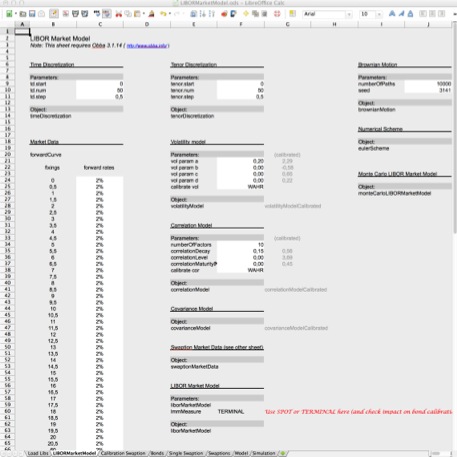
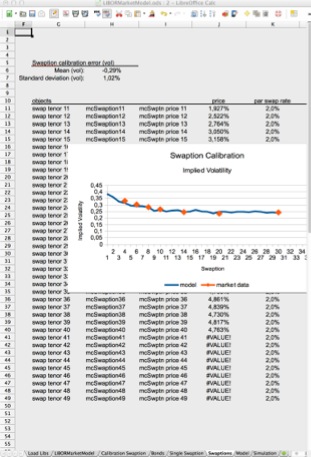
LIBOR Market Model: Spreadsheet and Source Code
Spreadsheet and code for the LIBOR market model added to finmath.net. Java source code availabe from the finmath lib subversion repository.
Curve Calibration: Spreadsheet and Source Code
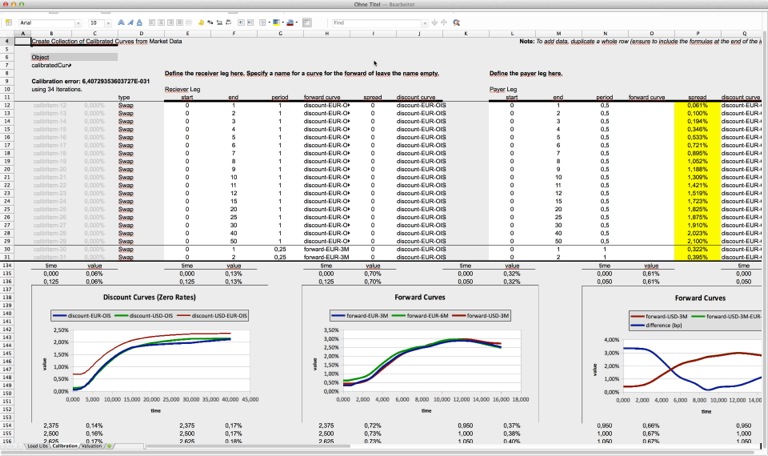
Demo spreadsheet for the calibration of curves (discount curves, forward curves) to interest rate swaps added to the spreadsheets section of finmath.net. Java source code availabe from the finmath lib subversion repository.
First Steps Towards a LaTeX to iBooks Conversions
However, the following seems to be promising:
- Create a simple documents (basically empty, some text) and insert a LaTeX formula.
- Save the document, for example as Test.iba
- Rename the document to Test.zip and in terminal type unzip Test.zip
- From the unzipped folder Test open the file Test/index.xml.
- In index.xml you will find your LaTeX formula at some place. Now, try to edit the latex within the index.xml (that is you edit the LaTeX source).
- Save the file, zip the folder back to Test.zip (using zip in the Terminal not from Finder) and rename it back to Test.iba.
- If you open the modified Test.iba you will see the document with the new formula.
Obba: Handling Java Objects in Excel, OpenOffice, LibreOffice and NeoOffice

New in version 3.1: Support for creating objects dynamically from source code, see Class to Object Demo (movie).
Obbaprovides a bridge between spreadsheets and Java classes. With Obba, you can use spreadsheets as GUIs (Graphical User Interfaces) for your Java libraries. Compatible with Excel/Windows, OpenOffice/Win/Mac/Linux, LibreOffice/Win/Mac/Linux, NeoOffice/Mac.
Obba's main features are: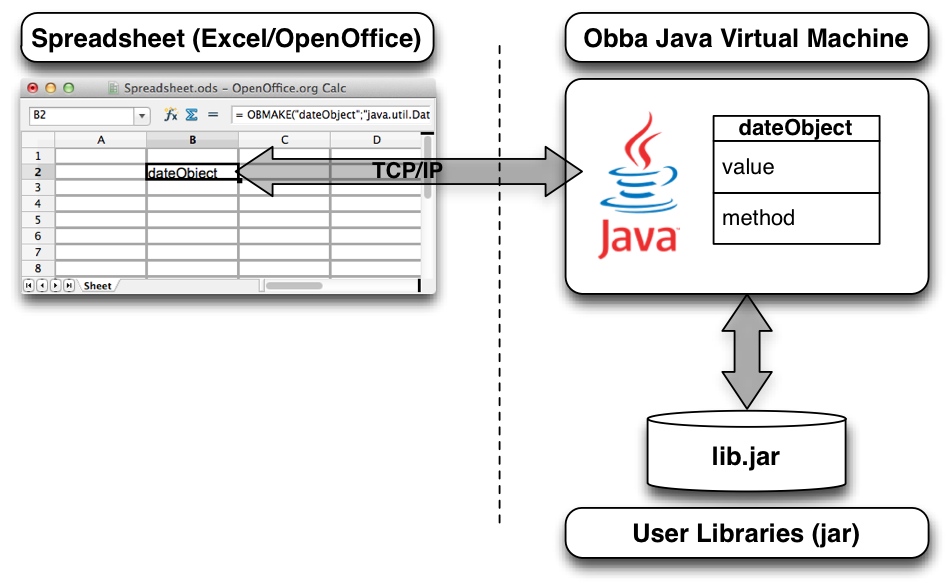
- Stateful access to almost all objects and methods running in a Java virtual machine via a fixed set of spread sheet functions.
- Client/server support: The Java virtual machine providing the add-in may run on the same computer or a remote computer - without any change to the spreadsheet.
- Loading of arbitrary jar or class files at runtime through a spreadsheet function.
- Instantiation of Java objects, storing the object reference under a given object label.
- Invocation of methods on objects referenced by their object handle, storing the handle to the result under a given object label.
- Asynchronous method invocation and tools for synchronization, turning your spreadsheet into a multi-threaded calculation tool.
- Allows arbitrary number of arguments for constructors or methods (avoids the limitation of the number of arguments for Excel worksheet functions).
- Serialization and de-serialization (save Serializable objects to a file, restore them any time later).
- All this through spreadsheet functions, without any additional line of code (no VBA needed, no additional Java code needed).
Use cases:
- For Spreadsheet Users: Creating powerful spreadsheet calculations using external libraries, running calculations in Java.
- For Java Developers: Testing, debugging and analyzing Java libraries with spreadsheets. Setting up unit test in spreadsheets. Using spreadsheets as GUI to your object while debugging.
Advanced Features:
- Run Obba server (and its JVM) on one machine, while the spreadsheet (with Obba add-in) runs on another machine.
- Obba allows to create an object from Java source code (dynamically compile source to java.lang.Class, re-load the class definition and instantiate an object from it), see Class to Object Demo (movie).
For tutorials see Obba tutorials. For a more detailed introduction see Obba documentation.
Obba: Handling Java Objects in Excel, OpenOffice, LibreOffice and NeoOffice

Obba provides a bridge between spreadsheets and Java classes. With Obba, you can use spreadsheets as GUIs for your Java libraries; turning your Java library to platform independent spreadsheet add-ins. Compatible with Excel/Windows, OpenOffice/Win/Mac/Linux, LibreOffice/Win/Mac/Linux, NeoOffice/Mac.
Its main features are:
- Stateful access to almost all objects and methods running in a Java virtual machine via a fixed set of spread sheet functions.
- Client/server support: The Java virtual machine providing the add-in may run on the same computer or a remote computer - without any change to the spreadsheet.
- Loading of arbitrary jar or class files at runtime through a spreadsheet function.
- Instantiation of Java objects, storing the object reference under a given object label.
- Invocation of methods on objects referenced by their object handle, storing the handle to the result under a given object label.
- Asynchronous method invocation and tools for synchronization, turning your spreadsheet into a multi-threaded calculation tool.
- Allows arbitrary number of arguments for constructors or methods (avoids the limitation of the number of arguments for Excel worksheet functions).
- Serialization and de-serialization (save Serializable objects to a file, restore them any time later).
- All this through spreadsheet functions, without any additional line of code (no VBA needed, no additional Java code needed).
For a tutorial see Obba tutorial. In this tutorial you create a Java class and a spreadsheet to fetch Stock quotes from finance.yahoo.com.
For a more detailed introduction see Obba documentation and Obba home page.
Version 3.0.6 of Obba is a major revision. It brings support for running the Java virtual machine on a different machine, i.e. via Obba, the spreadsheet may perform its Java calculations on a remote machine.
For more information see Obba's homepage.
Registering COM Add-In on 64 bit Windows (with NSIS / Wow6432Node)
- Use RegAsm.exe with the option /regfile to generate a list of registry entries.
- Create an NSIS script with the corresponding WriteRegStr entries to create these registry entries.
However, this method may not work if you like to use the installer on a 64 bit Windows 7 system to register the COM add-in for 64 bit applications. On a 64 bit system you will find some of your keys registered in the Wow6432Node, which is the part for 32 bit applications and not seen by 64 bit applications.
A workaround may be to use DLL host, however this workaround should only be used if your COM add-in is 32 bit only. The workaround will also work for COM add-ins which are 64 bit and 32 bit (compiled as "AnyCPU"), but performance will be poor.
The problem here is that NSIS creates a 32 bit installer which - per default - writes certain keys to the Wow6432Node (i.e. it registers the COM add-in for 32 bit applications). If you like to register the COM add-in for 64 bit applications (too) you have to register (again) using SetRegView 64 prior registration (search the internet for "NSIS SetRegView 64").
Note that the two version of RegAsm (one in Frameworks and one in Frameworks64) export the same registry entries when used with /regfile, but, writing to the registry, they write to the 32 bit or 64 bit view respectively.
See also http://support.microsoft.com/kb/305097 and note that registry reflection was removed in Windows 7 (see http://msdn.microsoft.com/en-us/library/aa384235.aspx )
Obba: Handling Java Objects in Excel, OpenOffice, LibreOffice and NeoOffice

Obba provides a bridge from spreadsheets (Excel or OpenOffice) to Java classes via worksheet functions (UDFs), without the need to write a single line of code. With Obba, you can easily build spreadsheet GUIs to Java classes. Obba is available for Excel and OpenOffice and Obba sheets may be migrated from Excel to OpenOffice or vice versa.
For more information see Obba's homepage.
OpenOffice extension with signed JAR not working
ImplementationRegistration::registerimplementation()
InvalidRegistryException during registration (prepareRegistry(): source registry is empty)
it could be related to a signed jar.
A Java based OpenOffice extension (.oxt) using a signed JAR (inside the .oxt bundle) may produce the error above if the the corresponding IDL_Types.jar is unsigned. To produce an OXT with a signed JAR create a .keystore (using keytool) and sign the JAR at the -pre-uno-package build step:
              <target name="-pre-uno-package">


                 <signjar jar="${dist.jar}"
              alias="yourAlias" storepass="yourPassword" />


                 <signjar
              jar="${dist.dir}/${idl_types.jar}" alias="yourAlias"
              storepass="yourPassword" />


              </target>
More Comments on iOS 4 Multitasking
Expiration Handlers
If a process is running in background, having issued UIApplication's beginBackgroundTask before, then the process expiration handler's code following the (last) issuing of endBackgroundTask is not executed. In other words: iOS 4 does not wait until your expiration handler block is finishes. It waits for the last endBackgroundTask and terminates the app (quite ungracefully).View Controllers
If your app enters background the active view controller does not receive a viewWillDisappear. Neither will it receive a viewWillAppear if the app enters foreground.Application Lifecycle
On iOS 4.0 the message applicationWillTerminate is rarely send. I made some tests and found the follwoing:- An app will not receice applicationWillTerminate if it is in background and user selects force quit (pressing the minus sign in the list of recent apps).
- An app will not receive applicationWillTerminate if is is in background and the user selects to shut down the device while your app is running.
- An app will not receice applicationWillTerminate if it is in background and system shuts down due to low battery.
- An app will receive applicationWillTerminate if it is in foreground and sytem shuts down due to low battery.
- An app will receive applicationWillTerminate if it is in foreground and the user selects to shut down the device while your app is running.
A Short Note on iOS 4 (iPhone OS) Multitasking
But: iOS 4 apps are fully multitasking with just two exceptions:
- The iOS 4 UI event loop is single tasked, i.e. only the front app is running on the UI event loop. If app code is designed to be running on the UI event loop thread, then it is not executing if it enters background. However, this is not a big restriction. An app will not receive any UI events when running in background anyway (even on Mac OS X). If you design your iOS 4 app to be detached from the UI event loop it continues to run when put to background.
- The OS may terminate your app when resources like memory are running low or "execution time" is used up. This is also not a big restriction. For example, on OS X if memory is running low the user is prompted to terminate an app. Also, on OS X I would terminate an app if it runs crazy and takes up all CPU time. So actually I believe it is an improvement to start thinking about rules when apps are terminated by the OS. (Note: For iOS 4 the rule which terminates an app is a bit too simple, as I will explain soon).
Apart from these restrictions you can run code in background. You can run your own run loop in background and register timers (events) with that run loop.
Background Run Loop
This is done with the following code:dispatch_async(dispatch_get_global_queue(DISPATCH_QUEUE_PRIORITY_DEFAULT, 0), ^{
// Create and register your timers
// ...
// Create/get a run loop an run it
// Note: will return after the last timer's delegate has completed its job
[[NSRunLoop currentRunLoop] run];
});
In the upcoming release of Serial Mail (Version 4.1) I have implemented a background task which sends mail via an SMTP server in background. This background task uses timers to check the response of the SMTP server an hence it is requiring a run loop. I was able to do network connections in background. Apple says that you should prepare that network connections may fail when the app is running in background (however an app needs to check for failing connections anyway).
App Termination
So this solves the first problem, that the UI thread is single threaded. What about iOS terminating your app when it runs in background: To prevent that the OS terminates the app we should tell it that we have a long running background task. Apple suggest that you mark each background tasks by calls to UIApplication's beginBackgroundTask and endBackgroundTask see the developer documentation's sample code. I haven't seen a definition of "long running", but it appears as if the app is terminated if a background task runs 10 minutes after the app has been suspended (it does not help to launch a new background task / thread from another one).Improving the App Termination Criteria
For my app 10 minutes background task time are sufficient. There are application where you require a truly long running background process checking stuff at certain intervals, etc. However, it is clear that the multitasking introduced in IOS 4 just needs a minor tweak: it requires more sophisticated rules for terminating apps. For apps with background task a much better rule would be to consider cpu time that real time. This would for example allow apps like instapaper to check and download files in background on a regular basis (say, once a day) if that task consumes only a small amount of cpu time. The author of instapaper discussed a different solution in his blog, however I hope for a simpler one: better, transparent criteria for termination of a background apps.Scheduled Relaunch
Another improvement of the current multitasking APIs, which is more in line with the solution in the instapaper blog, would be to include a user configurable service for scheduled relaunch of an app into background. The service should be configurable on an per app basis. Apps registering with it should bring up a dialog requesting for permission (like location service does). The service should then call a method like applicationDidLaunchToBackground. I would prefer such a solution over a myriad of specialized background services. Instead the relaunch service could take options like "relaunch when network available".There is one strange thing about iOS 4: When the user terminates the app manually (by deleting it from the list of recently used apps) then iOS does not call your app delegates applicationWillTerminate method. I have used applicationWillTerminate to save the application's state upon termination and now that code had to move to applicationWillResignActive.
Obba: Handling Java Objects in Excel, OpenOffice and NeoOffice

Obba provides a bridge from spreadsheets (Excel or OpenOffice) to Java classes via worksheet functions (UDFs), without the need to write a single line of code. With Obba, you can easily build spreadsheet GUIs to Java classes. Obba is available for Excel and OpenOffice and Obba sheets may be migrated from Excel to OpenOffice or vice versa.
For more information see Obba's homepage.
Release Notes
Version 1.9.34 of Obba brings the following changes:
- Fixed a problem which prevented loading of some classes. The current thread's context class loader was null. This appears to be a problem with the Java plugin. A workaround was created. Note: This problem resulted in the XMLDecoder not working.
- Fixed a problem which prevented installation of Obba for OpenOffice.
- More improvements for OpenOffice
- Arrays of objects can be created using obMake with a class name of ClassName[] where ClassName is the component type (see documentation for an example).
- Added a demo sheet showing how to access data from finance.yahoo.com. Include the Java source code for the class handling the web access.
Snow Leopard 64 Bit Kernel - Switching between Apps
The MBP booted with 32 bit version of the OS X 10.6 Kernel (this is the default) - thx O.S. for the hint. To my surprise, switching to the 64 bit kernel made a big difference. Switching between apps is much (!) snappier. (I did not see any perfomance test discussing app switching!)
PS: You can boot into the 64 bit kernel by changing the file
/Library/Preferences/SystemConfiguration/com.apple.Boot.plist
to include the following Kernel Flags
<key>Kernel</key>


              <string>mach_kernel</string>


              <key>Kernel Flags</key>


              <string>arch=x86_64</string>
How to Fetch Stock Quotes from Yahoo into Excel/OpenOffice using Java
Java code and spreadsheets are included.
Obba: Handling Java Objects in Excel and OpenOffice

Obba provides a bridge from spreadsheets (Excel or OpenOffice) to Java classes via worksheet functions (UDFs), without the need to write a single line of code. With Obba, you can easily build spreadsheet GUIs to Java classes. Obba is available for Excel and OpenOffice and Obba sheets may be migrated from Excel to OpenOffice or vice versa.
For more information see Obba's homepage.
Release Notes
Version 1.9.13 of Obba brings the following changes:
- Added a window to the Obba Control Panel which visualizes the objects and their dependencies in a graph. The dependencies are determined by the objects used during construction an object.
- Improved the handling of transient object handles.
iPhone OS App: Serial Mail

Serial Mail 4.6 released

Obba: Handling Java Objects in Excel and OpenOffice

Obba provides a bridge from spreadsheets (Excel or OpenOffice) to Java classes via worksheet functions (UDFs), without the need to write a single line of code. With Obba, you can easily build spreadsheet GUIs to Java classes. Obba is available for Excel and OpenOffice and Obba sheets may be migrated from Excel to OpenOffice or vice versa.
For more information see Obba's homepage.
Release Notes
Version 1.8.21 of Obba brings the following changes:
- Access fields of an object directly through a spreadsheet function call using 'obCall'. In this case the method name has to be dot + fieldname (e.g '.myMember').
- Access elements of an array through a spreadsheet function call using 'obCall'. In this case the method name has to be '[]' and the argument of the call is integer specifying the index. Element of multi-dimensional arrays can be accessed likewise.
- Vector arguments can be passed as arbitrary ranges (columns, rows or two dimensional ranges which are then flattened using row major).
iPhone OS App: Presentation Assistant
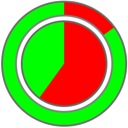
After playing around with the iPhone SDK for a while I wrote an application which supports me during a presentation with intuitively visualized timing information. For details see the Presentation Assistant home page.
Tip: uid 501 does not exist in the passwd file!
ssh username@machinename.local
then I cannot do sudo on that machine (getting the error "uid 501 does not exist in the passwd file!"). Also I can no do su (getting the error "su: who are you?"). However, if I log in using
ssh -l username machinename.local
everything works fine. Just in case you stumble across this problem...
Obba: Handling Java Objects in Excel and OpenOffice

Obba provides a bridge from spreadsheets (Excel or OpenOffice) to Java classes via worksheet functions (UDFs), without the need to write a single line of code. With Obba, you can easily build spreadsheet GUIs to Java classes. Obba is available for Excel and OpenOffice and Obba sheets may be migrated from Excel to OpenOffice or vice versa.
For more information see Obba's homepage.
Release Notes
This release fixes two small bugs in connection with the software registration: For OpenOffice the location where the registration is stored changed (you have to reenter registration data).
Serial Mail 4.3 released

Serial Mail 4.2 released

Serial Mail: Bug in OS X may trash your Address Book database

As a precaution when using Serial Mail, please backup your Address Book database. It is just one click to the File menu of the Address Book application.
Function Pointers and Delegates in C++
How to use other Microtek Scanners with ScanMaker 7 Pro

But the software works with other scanners (at least with my Microtek ScanMaker 3800). If you have a working installation of ScanWizard 5 V7 (I used version 7.21) then you may try to copy the driver from
/Library/Application Support/Scan Wizard 5
              V7/Scanner_Drivers
to
/Library/Application Support/Scan Wizard Pro
              7/Scanner_Drivers
.
Serial Mail Version 3.9 is Universal Binary